Parent & Classroom Guide
ADHD Focus Tools for Kids: Free Visual Timers & Homework Helpers
Most productivity tools are designed for working adults. But school-age children with ADHD struggle with the exact same executive function challenges, especially time blindness, homework paralysis, and morning routine friction. This guide explains how to use our free, ad-free, and account-free digital tools to scaffold your child's daily focus at home and in the classroom.
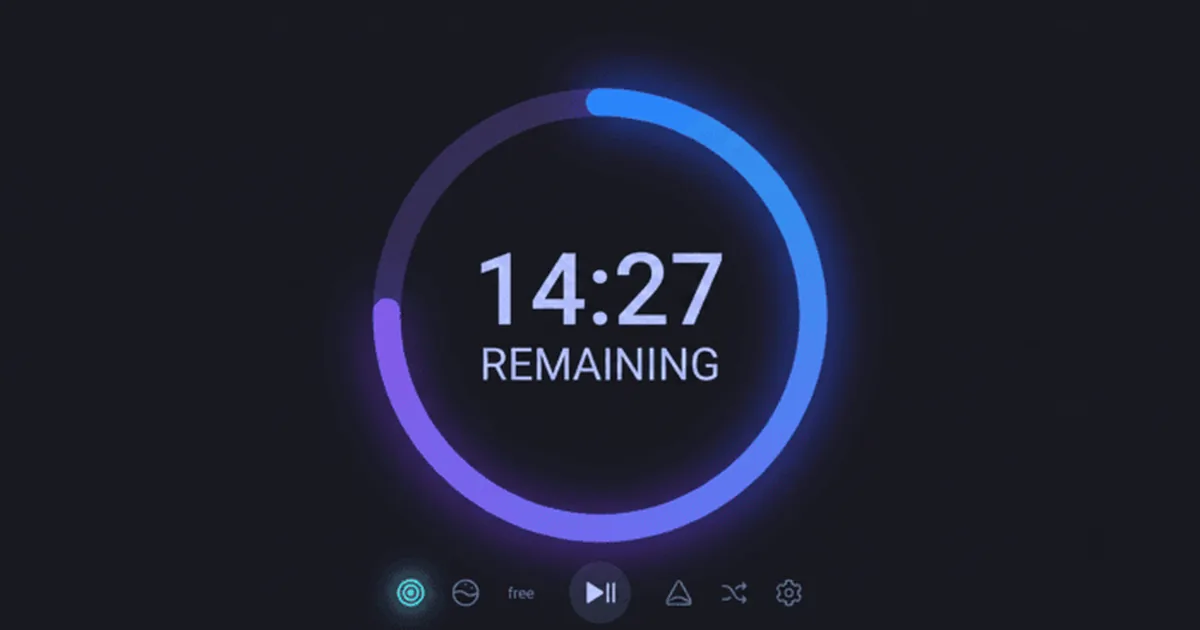
Table of Contents +
🎯 Quick Summary (TL;DR)
- Time blindness: TimeBlind's shrinking arc timer makes time visible for kids who can't sense it passing
- Homework paralysis: OneStep reveals one micro-step at a time so an assignment never feels like an insurmountable mountain
- Screen-time meltdowns: DopMenu gives kids a pre-built list of non-screen activities to pick from instead of a fight
- Morning dressing fatigue: WearToday narrows a whole closet down to three pre-approved outfit photos
- Cost and safety: All four tools are free, require no account, and keep every photo and task list on-device
1. Visual Timer for Kids ADHD (TimeBlind)
Children with ADHD do not experience time the way neurotypical kids do, a core symptom the CDC lists among ADHD's most common neurodevelopmental effects on children. To them, time is either "NOW" or "NOT NOW", a cognitive challenge known as time blindness. A traditional clock or numerical countdown causes anxiety or gets ignored.
TimeBlind replaces the abstract clock with a large, color-shifting circular progress ring that physically shrinks as time passes. It uses gentle chimes (not stressful alarm beeps) to transition between work and play.
How to use it for kids:
- Interval Chimes: Set 5-minute gentle chimes so your child has auditory anchors that say "you are doing great, keep going" without interrupting their flow.
- Homework Blocks: Set a short 10-to-15-minute Focus block followed by a 3-minute break. A visible, shrinking arc helps them see that the effort has a clear, close ending.
2. Homework Paralysis & Task Exploder (OneStep)
When a child with ADHD looks at a worksheet containing 10 math problems, their brain often perceives it as an insurmountable mountain, triggering a threat response (paralysis, tantrums, or avoidance). They are not refusing to work; their executive planning system is temporarily locked, a pattern CHADD covers in its guidance on executive functioning support for kids. This kind of quiet, non-disruptive stall is also one of the clearest early signs of inattentive ADHD, the presentation that looks like daydreaming rather than a classroom problem, and the one many parents still know as ADD (here's the difference between ADD and ADHD).
OneStep (Task Exploder) breaks overwhelming assignments down into tiny, isolated steps, showing only one step at a time.
How to use it for kids:
- Type in the chore or homework name (e.g., "Clean desk for homework" or "Do page 5 math sheets").
- Let the tool generate tiny, non-threatening steps.
- Present the screen showing only Step 1: "Open your folder." Hiding subsequent steps keeps their cognitive load low.
3. Stopping the Screen-Time Loop (DopMenu)
ADHD brains are naturally low in baseline dopamine, making kids highly susceptible to the instant, infinite gratification loops of video games and tablets. Getting them off screens often leads to emotional meltdowns.
DopMenu (Dopamine Menu Builder) helps parents and children collaborate on building a "menu" of healthy, non-screen activities that stimulate their brains.
How to use it for kids:
- Build the menu together with options categorized by time: 2-minute "starters" (doing 10 jumping jacks, hugging the dog), 10-minute "sides" (drawing a monster, listening to a favorite song), and 30-minute "mains" (building a Lego set, riding a bike).
- When it is time to transition off screens, let the child choose one item from their Dopamine Menu to replace the tablet.
4. Morning Dressing & Preparation Routine (WearToday)
Mornings are a high-friction battleground for ADHD kids. Selecting clothing, checking if it is appropriate for the weather, and getting dressed requires multiple layers of decision-making that drain early-morning prefrontal energy.
WearToday (Outfit Decider) reduces morning decision fatigue by picking a random outfit from a small pre-approved pool of your child's clothing photos.
How to use it for kids:
- Take quick photos of their favorite school tops, pants, and shoes.
- Set filters for the season/weather.
- Let the child press the roll button. Instead of fighting an entire closet, they choose between three curated options.
Parent & Teacher Best Practices
🏠 At Home: Scaffolding Transitions
Use visual timers to signal transitions before they happen. Tell the child: "When the blue arc disappears and the chime plays, we will choose a 5-minute reward from our Dopamine Menu." This eliminates the arbitrary feeling of parental commands.
🏫 In the Classroom: Self-Regulation
Teachers can display TimeBlind on the smartboard during quiet reading or worksheet tasks. The non-numeric, shrinking color bar lets students regulate their pace without reading clock dials.
Older kids and teens often show a related pattern: emotional reactions to criticism or correction that are far bigger than the moment calls for. If that sounds familiar, see our guide to rejection sensitive dysphoria in ADHD for what's happening and how to help. For the adult-focused version of this same toolkit, see our complete ADHD focus tools guide.
Not sure whether what you are seeing is ADHD at all? Our guide to the signs of ADHD in kids covers the symptoms by age, what can look like ADHD but isn't, and how a diagnosis works.
ADHD often runs in families, so if you are a parent looking for support for yourself too, our roundup of ADHD apps for adults compares the main options by price and privacy.
Frequently Asked Questions
How does a visual timer help a child with ADHD?
Children with ADHD experience time blindness, the inability to feel the passage of time. A visual timer like TimeBlind replaces abstract numbers with a shrinking colored arc. This makes time tangible. It helps kids understand how much time is left for a task or when a break is coming, reducing anxiety and transitions tantrums without the stressful ticking of traditional clocks.
What is the best way to help an ADHD child start homework?
ADHD children often experience task initiation paralysis because a homework sheet looks like a mountain of work. The best way to help is radical task decomposition. OneStep (Task Exploder) breaks assignments down into single, micro-actions (e.g., 'open the math book to page 4'). Revealing only one step at a time keeps the child's brain from shutting down due to overwhelm.
Can kids use these ADHD tools independently?
Yes, once set up by a parent or teacher. The tools require zero login, zero passwords, and contain no ads or third-party links, making them a safe, distraction-free environment for kids. The visual interfaces are designed to be intuitive for school-age children.
What are the best tools for kids with ADHD?
This guide covers free browser tools for kids with ADHD: a visual timer for time blindness, a task exploder for homework paralysis, a dopamine menu to replace screen-time loops, and a morning routine helper. None of them need a signup.
🔒 100% Safe and Private for Children
ZeroLoginFocus collects no personal data, requires no accounts or email addresses, and contains absolutely zero advertising. It is a completely safe, distraction-free environment for kids. All wardrobe photos and task lists stay in your device's local browser memory.